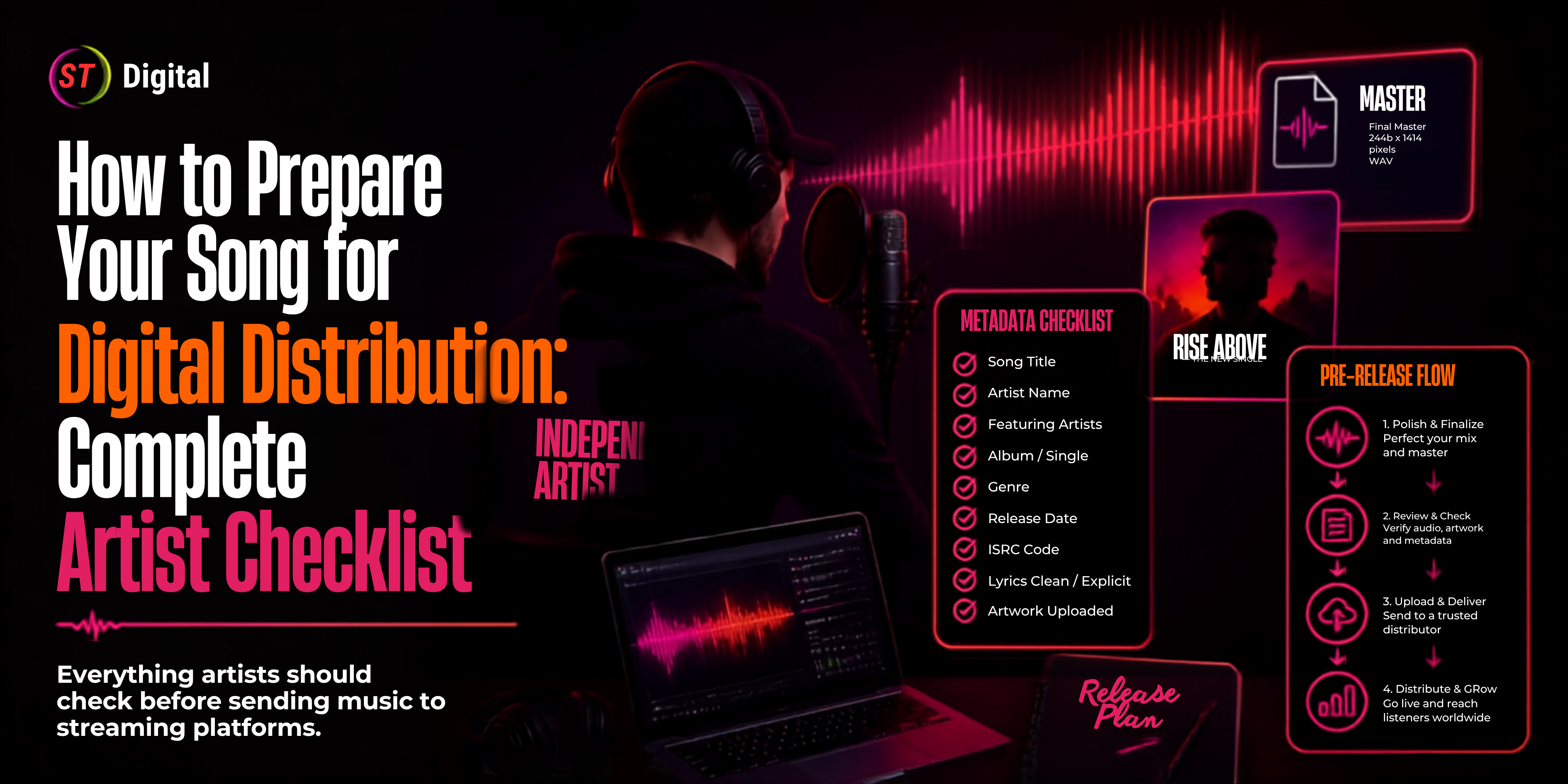
Finishing a song is only the beginning of a music release.
Before your track reaches Spotify, Apple Music, JioSaavn, YouTube Music, Amazon Music and other digital platforms, you need to prepare several important elements, including your master audio, cover artwork, metadata, artist information, credits, rights documentation and release schedule.
A missing credit, incorrect artist name, poor-quality artwork or incomplete metadata can create unnecessary delays and corrections.
That's why every independent artist should have a music distribution checklist before submitting a song to a distributor.
This guide provides a practical pre-release checklist that Indian artists, singers, producers, labels and independent musicians can use before distributing their music online.
What Is a Music Distribution Checklist?
A music distribution checklist is a list of everything you should prepare and verify before sending your song to a digital distributor.
It normally covers six major areas:
Audio
Artwork
Metadata
Rights and ownership
Release information
Promotion and post-release planning
A distributor then uses this information to deliver your release to supported digital platforms.
For example, ST Digital's distribution system allows artists and labels to upload recordings and associated release information for digital distribution. Its published materials describe distribution across major music platforms and multiple release formats, including singles, EPs and albums.
Why Preparation Matters Before Music Distribution
Uploading a song without checking the details can lead to avoidable problems.
Common issues include:
Incorrect artist names
Wrong song titles
Missing contributors
Incorrect release dates
Poor-quality audio
Incorrect artwork
Missing rights information
Duplicate or incorrect ISRC information
Releases submitted too close to the intended launch date
Recent Indian music-release guides also emphasize preparing the audio, artwork, metadata, identifiers and release schedule before submitting music to a distributor.
The goal isn't simply to get your song uploaded.
The goal is to submit a complete, accurate and release-ready package.
Complete Music Distribution Checklist
Here's the quick version before we go into each section.
Checklist ItemReady?Final mastered audio☐Artist name confirmed☐Song title confirmed☐Featured artists confirmed☐Cover artwork prepared☐Genre selected☐Language selected☐Composer credit☐Lyricist credit☐Producer credit☐ISRC information☐Rights cleared☐Release date selected☐Explicit-content information☐Distributor account☐Platform selection☐Promotional plan☐Final metadata review☐
Now let's break down every item.
1. Finalize Your Song Before Distribution
The first item on your checklist should be the final master.
Don't distribute a demo, unfinished mix or temporary version.
Your final audio should be the exact version you want listeners to hear.
Check your master for:
Listen to the complete track from beginning to end before uploading it.
Also listen on more than one playback system, such as:
The purpose isn't to make every system sound identical. It's to catch obvious problems before distribution.
2. Keep a High-Quality Audio File Ready
Your distributor will have specific technical requirements for audio.
A common professional workflow is to keep a high-quality master rather than sending a compressed social-media preview or messaging-app copy.
ST Digital's published release guide, for example, recommends a WAV or high-quality MP3 and emphasizes properly balanced audio without distortion or sudden volume jumps.
Before uploading, ask:
Is this the final approved master?
If the answer is no, don't distribute it yet.
3. Prepare Professional Cover Artwork
Your cover artwork is one of the first things listeners see.
Prepare the artwork before starting the distribution process.
For a typical digital single, your artwork should be:
ST Digital's existing release guidance gives 3000 × 3000 pixels as an example for square artwork and advises against elements such as streaming-platform logos, URLs and misleading text.
Artwork checklist
☐ Correct artist name
☐ Correct song title
☐ High-resolution image
☐ Square format
☐ No unnecessary promotional text
☐ No unauthorized images
☐ No misleading platform logos
☐ No incorrect credits
Always check the current requirements of your chosen distributor before final export.
4. Confirm Your Artist Name
Your artist name should be decided before you submit your release.
Search your chosen artist name across major platforms and social media.
Why?
Because another artist may already be using the same or a very similar name.
For example:
Artist: Rahul Sharma
If several artists use that name, metadata and artist-profile identification become especially important.
If you already have an artist profile, keep your artist name consistent across releases.
5. Collect Your Artist IDs
If you already have music online, collect the relevant artist-profile IDs before creating your release.
These can include IDs for:
Spotify
Apple Music
YouTube
Other supported services
This can help your distributor identify the correct artist profile.
ST Digital's Artist Help page explains how artists can locate their Spotify Artist ID and other platform identifiers.
Pro tip
Create a simple document containing all your artist IDs.
For example:
Artist Name:
Spotify Artist ID:
Apple Music Artist ID:
YouTube Channel ID:
Instagram:
YouTube:
Keep this information for future releases.
6. Prepare Accurate Metadata
Metadata is the information that describes your song.
It is one of the most important parts of your music distribution checklist.
Typical metadata includes:
Song title
Primary artist
Featured artist
Composer
Lyricist
Producer
Language
Genre
Release date
Copyright information
Recording information
Version information
ISRC guidance also identifies core recording metadata such as the main artist, track title, version information, duration, content type and publication date.
7. Double-Check Your Song Title
Your song title should be entered exactly as intended.
Avoid adding unnecessary promotional phrases.
For example, don't turn:
Kesariya
into:
Kesariya Official Song 2026 Latest Viral Hit
unless those words genuinely form part of the official title and comply with platform requirements.
Your metadata should describe the actual release, not act like an advertisement.
8. Confirm Featured Artists
If another artist appears on the recording, make sure their contribution is represented correctly.
For example:
Song: Dil Se
Primary Artist: Artist A
Featured Artist: Artist B
Don't accidentally list a producer or songwriter as a featured artist unless their role actually qualifies.
9. Prepare Composer, Lyricist and Producer Credits
Make a complete list of everyone involved.
Depending on your release, this can include:
Vocalist
Composer
Lyricist
Music producer
Featured artist
Remixer
Performer
Accurate credits are important for maintaining a professional catalog.
Don't wait until after distribution to figure out who should be credited.
10. Check Your ISRC
An ISRC (International Standard Recording Code) identifies a particular sound recording.
According to the International ISRC Agency, ISRC is used to identify sound recordings and music videos and remains a reference point when a recording is used across different services and territories.
If you already have an ISRC for the same recording, keep it available and enter it correctly when required.
If it's a new recording, follow your distributor's process for obtaining or assigning the appropriate code.
Important
Don't randomly create a new code for an existing recording.
Keep your recording identifiers organized in your catalog records.
11. Confirm Ownership and Rights
Before distributing a song, make sure you have the necessary rights to distribute it.
Ask yourself:
Did you create the recording yourself?
If yes, maintain your ownership records.
Did you use a beat?
Check the beat license.
Did you use samples?
Make sure the required permissions are in place.
Did another singer, musician or producer participate?
Make sure your agreements and credits are clear.
Did you use copyrighted artwork?
Make sure you have permission to use it commercially.
Rights problems can become much more complicated after a release is already live.
12. Check Samples and Third-Party Material
This is particularly important for producers and remix artists.
Before distributing a track, identify:
Read the relevant license terms.
A file being available online does not automatically mean that you have commercial distribution rights.
13. Decide Whether Your Release Is a Single, EP or Album
Before opening your distributor dashboard, decide what you're releasing.
Single
One main track.
EP
A small collection of tracks.
Album
A larger collection of songs intended as one release.
This sounds simple, but organizing your catalog before upload can save time.
ST Digital states that its distribution service supports formats including singles, EPs, albums and pre-orders.
14. Choose Your Release Date Carefully
Don't select your release date randomly.
Consider:
If the song is important to your campaign, leave enough time between submission and launch.
Recent Indian release guides recommend planning releases weeks ahead when possible rather than relying on last-minute distribution.
15. Prepare Your Platform List
Decide where you want your song distributed.
Depending on your distributor and release, this can include:
Spotify
Apple Music
YouTube Music
Amazon Music
JioSaavn
Gaana
Deezer
TikTok
Facebook
Instagram
Pandora
Other digital platforms
ST Digital currently describes distribution across major platforms and promotes access to a broad network of digital stores.
This is where choosing the right digital distribution platforms becomes important.
16. Check Your Language and Genre
Indian music is extremely diverse.
Your release may be:
Hindi
Punjabi
Rajasthani
Haryanvi
Marathi
Gujarati
Bengali
Bhojpuri
Tamil
Telugu
Malayalam
Kannada
English
Instrumental
Select the correct language and genre during distribution.
Accurate classification gives platforms better information about your content.
17. Prepare Copyright Information
Depending on your release and distributor, you may need copyright-related information.
Keep records of:
Master owner
Label name
Composer
Lyricist
Copyright year
Rights agreements
Beat licenses
Sample clearances
Don't assume that distribution automatically establishes ownership.
Distribution and copyright ownership are separate matters.
18. Prepare Your Distributor Account
Before uploading your song, create your account with your selected distributor.
If you're considering ST Digital, its platform provides an online distribution system where artists can upload music and artwork and manage releases.
You can also review ST Digital's current music distribution service to understand its distribution workflow.
Keep your account details accurate because your distributor account will become part of your release-management workflow.
19. Review the Distributor's Current Terms
This step is often overlooked.
Before agreeing to a distribution service, read the current terms covering:
Rights
Territory
Revenue sharing
Fees
Reporting
Takedowns
Termination
Content requirements
Promotional rights
Payment procedures
For example, ST Digital publishes a current Content Licensing and Distribution Agreement describing its digital distribution system, rights, reporting and revenue arrangements. The actual agreement in force should be reviewed before accepting it.
Don't choose a distributor based only on a headline such as "free distribution."
Understand what free means under the current terms.
20. Prepare Your Release Description
Some distribution systems may require or provide fields related to release information.
Keep your information concise and accurate.
Don't stuff descriptions with keywords.
Your music metadata is not the same thing as an SEO page.
21. Create a Folder for Every Release
One of the easiest ways to stay organized is to create one master folder for every song.
For example:
Artist_Name/
└── Song_Name_2026/
    ├── Final_Master.wav
    ├── Cover_Artwork.jpg
    ├── Lyrics.txt
    ├── Credits.txt
    ├── ISRC.txt
    ├── Rights_Documents/
    └── Promotion/
This makes future releases much easier to manage.
22. Keep Your Lyrics Ready
Even when lyrics aren't required for the initial distribution submission, keep an accurate lyric document.
Make sure it contains:
This is especially useful for multilingual and regional releases.
23. Prepare Your Promotional Assets
Don't wait until your song is live to start marketing it.
Before release, prepare:
One song can generate multiple pieces of content.
24. Plan Your Spotify and Streaming Promotion
Distribution makes the song available.
Promotion helps people discover it.
Your promotional plan can include:
Before Release
Release Day
Streaming link
Instagram Reel
YouTube Short
Artist announcement
WhatsApp sharing
After Release
Don't stop promoting after the first 24 hours.
25. Check Everything Before Pressing Submit
This should be your final quality-control stage.
Audio
☐ Correct master
☐ No clipping
☐ No accidental silence
☐ Correct version
Artwork
☐ Correct size
☐ Correct artist name
☐ Correct song title
☐ Clear and high quality
Metadata
☐ Song title
☐ Artist name
☐ Featured artist
☐ Genre
☐ Language
☐ Composer
☐ Lyricist
☐ Producer
Rights
☐ Master rights cleared
☐ Samples cleared
☐ Beat license checked
☐ Artwork rights checked
Distribution
☐ Distributor selected
☐ Platforms selected
☐ Release date selected
☐ Artist ID supplied
☐ ISRC checked
Marketing
☐ Social posts prepared
☐ Short videos prepared
☐ Release announcement prepared
☐ Streaming links planned
The 24-Hour Final Check
Before submission, take one final day—or at least a dedicated review session—to check everything with fresh eyes.
Ask another person from your team to review:
Audio → Artwork → Metadata → Credits → Rights → Release Date
A second review can catch simple mistakes that the artist may overlook after working on the song for weeks.
Common Music Distribution Mistakes
Mistake 1: Uploading the Wrong Audio
Always listen to the final file before submission.
Mistake 2: Using an Unclear Artist Name
Search your artist name and maintain consistency.
Mistake 3: Incorrect Artwork
Make sure the artwork meets the distributor's current requirements.
Mistake 4: Missing Credits
Prepare contributor information before uploading.
Mistake 5: Ignoring Rights
Never distribute material you don't have the necessary rights to use.
Mistake 6: Entering Incorrect ISRC Information
Treat recording identifiers as important catalog data.
Mistake 7: Last-Minute Release
Give yourself enough time for processing and corrections.
Mistake 8: No Promotion Plan
Uploading the song is not the same as marketing the song.
Complete Pre-Distribution Checklist
Save this checklist for your next release.
🎵 Audio
Final master approved
High-quality file exported
Audio checked from beginning to end
No clipping or unwanted noise
Correct version selected
🎨 Artwork
📝 Metadata
Song title
Artist name
Featured artist
Composer
Lyricist
Producer
Genre
Language
Version information
🔐 Rights
🔢 Identifiers
📅 Release
Single/EP/Album selected
Release date selected
Platforms selected
Distributor selected
Terms reviewed
📢 Promotion
How ST Digital Can Help With Your Music Distribution
Once your release package is ready, the next step is choosing a music distribution service.
ST Digital provides a platform for artists and labels to upload music and artwork for digital distribution. Its current website lists Spotify, Apple Music, YouTube, TikTok, Deezer, Amazon Music, Pandora and Facebook among its platform partners.
You can explore the ST Digital Music Distribution Service to learn about its current distribution workflow.
For artists who want to distribute more than just audio, ST Digital also provides broader digital distribution services covering music, video, lyrics and caller-tune/CRBT distribution.
Final Thoughts
A successful music release doesn't begin when you click Upload.
It begins when your song is properly prepared.
The best approach is simple:
Finish the master → Prepare artwork → Organize metadata → Confirm rights → Check ISRC → Select your distributor → Choose platforms → Set your release date → Review everything → Submit → Promote.
For independent artists, having a repeatable music distribution checklist can make every future release easier.
Instead of discovering problems after submission, you can catch them before your song reaches the stores.
And when you're ready to distribute, choose a music distributor whose current platform coverage, terms, reporting and rights arrangements fit your release strategy.
Frequently Asked Questions (FAQs)
1. What should I prepare before music distribution?
At minimum, prepare your final audio master, cover artwork, artist information, song metadata, contributor credits, rights information, release date and any required identifiers such as ISRC.
2. What is the most important part of a music distribution checklist?
There isn't one single item. Audio quality, accurate metadata, artwork, rights clearance and release information all need to be correct.
3. Do I need an ISRC to distribute music?
ISRC is an important identifier for sound recordings. Follow your distributor's current process for obtaining or entering the appropriate code. The International ISRC Agency explains that ISRC identifies individual sound recordings and music videos.
4. Can independent artists distribute music without a record label?
Yes. Independent artists can use digital music distributors to deliver their recordings to streaming and digital platforms.
5. How early should I prepare my song for distribution?
Start preparing as early as possible. If you have a specific release date or promotional campaign, leave enough time for distributor processing, corrections and marketing.
6. What audio format should I upload?
Use the highest-quality final master accepted by your distributor. Check the distributor's current technical specifications before uploading.
7. What information is included in music metadata?
Metadata can include artist name, song title, featured artists, composer, lyricist, producer, language, genre, release date and recording identifiers.
8. Can I use copyrighted artwork for my song cover?
Only if you have the necessary rights or permission to use it.
9. Should I promote my song before it is released?
Yes. Preparing promotional content before release gives you time to build awareness instead of starting your marketing campaign after the song goes live.
10. What is the difference between a music distributor and a streaming platform?
A music distributor delivers your recording and release information to digital platforms. A streaming platform such as Spotify provides the environment where listeners can access and stream the music.

 November 1, 2026