Releasing music independently is easier than ever. With digital music distribution, independent artists can submit their songs to Spotify, Apple Music, YouTube Music, Amazon Music, JioSaavn and other streaming platforms without necessarily working with a traditional record label.
However, uploading a song does not automatically mean it will be accepted.
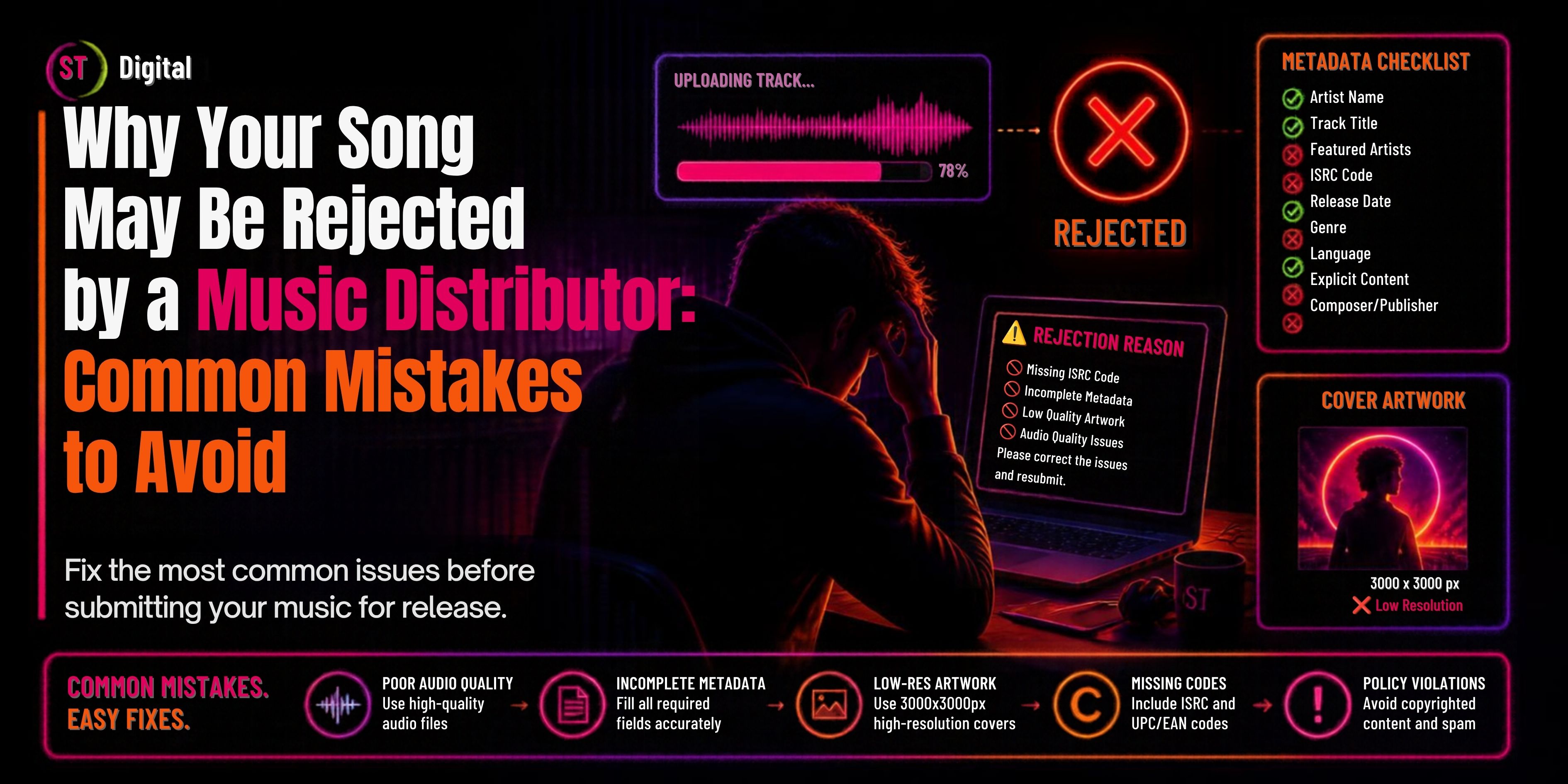
A music distributor reviews the release information and assets submitted by an artist, while digital platforms may also have their own requirements for audio, artwork, metadata, copyright and content.
As a result, a song can be rejected, delayed or returned for corrections if something is incomplete, inaccurate or doesn't meet the applicable requirements.
The good news is that most common mistakes can be avoided with proper preparation.
In this guide, we'll explain why your song may be rejected by a music distributor, the most common mistakes independent artists make, and what you should check before submitting your next release.
What Does It Mean When a Music Distributor Rejects a Song?
When a distributor rejects a song, it generally means the release cannot move forward in its current form.
The problem may be related to:
A rejection does not necessarily mean your music is bad.
In many cases, the distributor simply needs you to correct an issue before the release can be delivered to digital platforms.
1. Your Audio File Does Not Meet Technical Requirements
Your final audio master is one of the most important parts of your release.
Common audio problems include:
Before submitting your song, make sure you are uploading the final approved master.
If you are still planning to change the mix or mastering, don't rush to distribute the song.
A professional release should be properly mixed, mastered and carefully checked from beginning to end.
2. Your Cover Artwork Does Not Meet Requirements
Your cover artwork is another common source of distribution problems.
Your artwork should be professional, clear and compliant with the current requirements of your distributor and target platforms.
Problems may occur when artwork contains:
Blurry images
Incorrect artist names
Incorrect song titles
Misleading information
Streaming-platform logos
Unnecessary URLs
Contact information
Unauthorized images
Poor-quality graphics
Your artwork should also match the metadata submitted with your release.
Artwork checklist
Before uploading:
Artist name is correct
Song title is correct
Artwork is square
Image is high quality
No unauthorized images
No misleading information
No unnecessary promotional text
No platform logos
Artwork follows current distributor requirements
3. Your Music Metadata Is Incorrect
Music metadata is the information associated with your song or release.
It can include:
Artist name
Song title
Album or EP title
Featured artists
Composer
Lyricist
Producer
Genre
Language
Release date
Version information
Copyright information
ISRC
Incorrect metadata can create problems with artist attribution, catalog organization, credits and platform display.
Common metadata mistakes
For example, don't turn your actual song title:
Kesariya
into:
Kesariya Official Video Latest Viral Song 2026
unless those words are genuinely part of the official title.
Your metadata should accurately represent the actual release.
4. Your Artist Name Is Incorrect
Your artist name should remain consistent across releases.
For example:
Release 1: Rahul Sharma
Release 2: Rahul Kumar Sharma
Release 3: RahulSharma Official
These differences can create artist-identity and catalog-management problems.
If you already have music available on Spotify or other platforms, provide the correct artist information when your distributor requests it.
Avoid changing spelling or capitalization without a genuine reason.
5. Your Song Credits Are Missing or Incorrect
Music releases often involve several contributors.
Depending on the recording, you may need to provide information for:
Main artist
Featured artist
Composer
Lyricist
Songwriter
Producer
Remixer
Performer
Other contributors
Don't incorrectly enter a producer as a featured artist or a songwriter as a main artist.
Accurate credits help ensure that the people involved in creating the recording are properly identified.
6. You Don't Have the Necessary Copyright or Distribution Rights
This is one of the most important issues to check before distribution.
Before uploading music, make sure you have the necessary rights, licenses and permissions for the content you are distributing.
Potential problems include:
Using someone else's beat without permission
Using an uncleared sample
Uploading copyrighted music you don't own
Using artwork without permission
Distributing a recording owned by another person or company
Using third-party material without the necessary commercial license
If you don't have the rights to distribute something, don't upload it until the rights issue has been properly resolved.
7. Your Sample Has Not Been Cleared
Samples can create serious copyright issues.
Your song might contain:
A sample from another recording
Movie dialogue
Copyrighted sound effects
Another artist's vocals
A recognizable section of another song
Don't assume that something available online is automatically free to use commercially.
If your release contains a sample, confirm that you have the necessary permission or license.
8. Your Beat or Instrumental Is Not Properly Licensed
Many independent artists purchase beats online.
However, purchasing a beat does not necessarily mean you own unlimited commercial rights to it.
Depending on the license, restrictions may apply to:
Streaming
Monetization
YouTube Content ID
Commercial distribution
Exclusivity
Number of streams
Territory
Always read your beat license carefully.
Keep a copy of the license and supporting documentation for your records.
9. Your Release Contains Misleading Information
Your title, artwork and metadata should accurately describe the release.
Avoid adding promotional keywords simply to attract searches.
For example, don't use:
My Song - Official Video - Viral Hit - Best Song 2026
unless those words are actually part of the official title.
Digital music metadata is not the place for keyword stuffing.
Keep your release information accurate and professional.
10. Your Explicit Content Is Not Properly Identified
If your song contains explicit content, make sure the appropriate explicit-content designation is selected during distribution.
Don't simply add words such as:
Explicit
Dirty Version
Adult
18+
to your song title unless they are genuinely part of the official title and permitted by the distributor.
Always follow the current metadata requirements of your distributor and target platforms.
11. Your Release Date Is Too Close
Last-minute distribution is another common mistake.
An artist may finish a song today and expect it to be live tomorrow.
But distribution involves processing, review and delivery to digital platforms.
A better approach is:
Finalize → Upload → Review → Distribution → Promotion → Release
Give yourself enough time to fix unexpected issues.
If your release is important, plan the distribution well before your desired launch date.
12. Your Song Has Already Been Distributed Elsewhere
Artists sometimes submit the same recording through multiple distributors without checking their agreements.
This can create:
Duplicate deliveries
Conflicting metadata
Catalog confusion
Rights conflicts
Takedown problems
Before moving a release from one distributor to another, understand your existing agreement and make sure the transition is handled properly.
Don't assume that distributing the same recording through multiple services is always permitted.
13. Your ISRC Information Is Incorrect
An ISRC (International Standard Recording Code) identifies a specific sound recording.
Problems can occur when:
An incorrect ISRC is entered
The wrong recording is associated with an ISRC
A new ISRC is incorrectly created for an existing recording
An existing ISRC is copied incorrectly
If you're transferring an existing recording between distributors, check the correct ISRC and follow the distributor's instructions.
Don't create random codes.
14. Your Artwork and Metadata Don't Match
Imagine your artwork says:
Dil Mera
but your metadata says:
Dil Mera Hai
This inconsistency can create unnecessary problems.
Before submitting, make sure the following match:
A simple final cross-check can prevent avoidable corrections.
15. Your Artist Profile Information Is Wrong
Artist-profile matching is particularly important when multiple artists have similar names.
If you provide incorrect artist information, your release could potentially appear on the wrong artist profile.
Before distribution, collect:
Correct artist name
Existing artist profile
Spotify artist information
Relevant platform artist IDs
Previous release information
If you already have a Spotify artist profile, provide the correct profile information to your distributor.
16. Your Content Violates Distributor or Platform Policies
Distributors and streaming platforms have content and compliance policies.
A release may be rejected or removed if it violates applicable rules involving:
Always check your distributor's current terms before uploading.
17. You Submitted an Incomplete Release
Sometimes there isn't one major problem.
Instead, several small pieces are missing.
For example:
Individually, these might look minor.
Together, they can prevent your release from moving smoothly through distribution.
How to Avoid Song Rejection
The best strategy is simple:
Prepare Everything Before You Upload
Before starting your distribution submission, prepare the complete release package.
Audio
Artwork
Metadata
Artist name
Song title
Featured artists
Composer
Lyricist
Producer
Genre
Language
Version
Release date
Rights
Identifiers
Complete Pre-Submission Checklist
Use this checklist before submitting your next song.
🎵 Audio
🎨 Artwork
Square format
High resolution
Correct artist name
Correct song title
No unauthorized images
No platform logos
No unnecessary URLs
📝 Metadata
Artist name
Song title
Featured artist
Composer
Lyricist
Producer
Genre
Language
Version
Release date
🔐 Copyright
🔢 Identifiers
What Should You Do If Your Song Is Rejected?
Don't panic.
First, carefully read the rejection reason provided by your distributor.
For example:
Artwork issue
→ Review your cover artwork.
Metadata issue
→ Review artist name, title, credits, genre and other release information.
Copyright issue
→ Review ownership, licenses and permissions.
Audio issue
→ Check your final master and technical specifications.
Then correct the identified issue and resubmit according to your distributor's instructions.
A rejection is often a correction opportunity rather than the end of your release.
How to Upload a Song Correctly
If you want to avoid common mistakes from the beginning, understand the complete upload workflow before submitting your release.
You can read our complete guide on how to upload a song on Spotify in India, which covers preparing your audio, artwork, metadata, credits, ISRC, selecting platforms, choosing a release date and submitting your music for distribution.
This is especially useful for first-time independent artists who want to understand each step before uploading.
Music Distribution With ST Digital
Once your release is properly prepared, you need a reliable music distribution service to deliver your music to digital platforms.
ST Digital provides music distribution services that allow artists to upload their tracks, albums and singles for distribution across major digital music services. Its current music distribution page highlights global distribution, analytics, account support and a free distribution option.
The most important thing is to submit a release that is:
Always review the current distributor terms and requirements before submitting your music.
Final Thoughts
A song may be rejected by a music distributor for many different reasons, but most common problems can be prevented with proper preparation.
The biggest mistakes to avoid include:
Uploading unfinished audio
Using poor-quality artwork
Entering incorrect metadata
Using an incorrect artist name
Missing credits
Distributing music without the necessary rights
Using uncleared samples
Using improperly licensed beats
Entering incorrect ISRC information
Submitting too close to the release date
Creating duplicate distribution conflicts
Ignoring distributor requirements
Your goal shouldn't simply be to upload a song.
Your goal should be to submit a release that is technically correct, legally cleared, professionally presented and ready for digital distribution.
A few minutes spent checking your release before submission can save days of corrections later.
Frequently Asked Questions (FAQs)
1. Why do music distributors reject songs?
Songs may be rejected because of audio problems, incorrect metadata, artwork issues, copyright concerns, missing information, incorrect credits, duplicate distribution or violations of distributor or platform policies.
2. Can a song be rejected because of bad artwork?
Yes. Artwork that does not meet current technical or content requirements can cause a release to be rejected or returned for correction.
3. Can copyright issues cause music distribution rejection?
Yes. Artists need the necessary rights, licenses and permissions to distribute their music and any third-party material included in the release.
4. Can incorrect metadata cause rejection?
Yes. Incorrect artist names, song titles, credits, release information or other metadata can create distribution problems.
5. Why is my song delayed instead of rejected?
A distributor or platform may need additional processing, corrections or review before the release becomes available.
6. Can I distribute the same song through two distributors?
Don't assume that you can. Check the terms of your distribution agreements and avoid creating conflicting or duplicate deliveries.
7. What should I do after my song is rejected?
Read the rejection reason, identify the affected part of the release, correct the issue and resubmit according to your distributor's instructions.
8. How can I reduce the chance of rejection?
Prepare your final audio, professional artwork, accurate metadata, correct credits, valid identifiers and necessary copyright permissions before uploading.
9. Does an ISRC need to be checked before distribution?
Yes. If your recording already has an ISRC, make sure the correct identifier is submitted and follow your distributor's instructions.
10. How early should I submit my song?
Give yourself enough time for distributor processing, platform delivery and potential corrections. Avoid relying on last-minute distribution for an important release.

 November 1, 2026